Actionbooks get long. Fast.
What starts as ten clean rules — when to escalate, how to handle a refund, what to say when an order is missing — turns into dozens. New intents. Nested conditionals. Policy exceptions stacked on policy exceptions. Edge cases your ops team discovered at 11pm on a Friday.
And they're never done. A refund threshold changes. A new product launches. Legal updates the cancellation policy. Your AI needs to know — today, not next sprint. But the only person who can touch the actionbook is in engineering, buried in a backlog.
So the AI keeps running the old rules. And every conversation it handles is a conversation running on stale logic.
Edit your AI's rules like a doc
The problem was never that ops teams didn't understand the logic. They wrote the original playbooks, trained the human agents, and caught the edge cases at 11pm. They knew exactly what needed to change. They just couldn't touch the file.
Actionbook Editor is built for them. It opens inside Workspace Settings, but instead of a raw prompt in a textarea, there's a structured document — sections for behavioral rules, global actions, and conditional blocks, all editable by anyone on your team without a line of code.
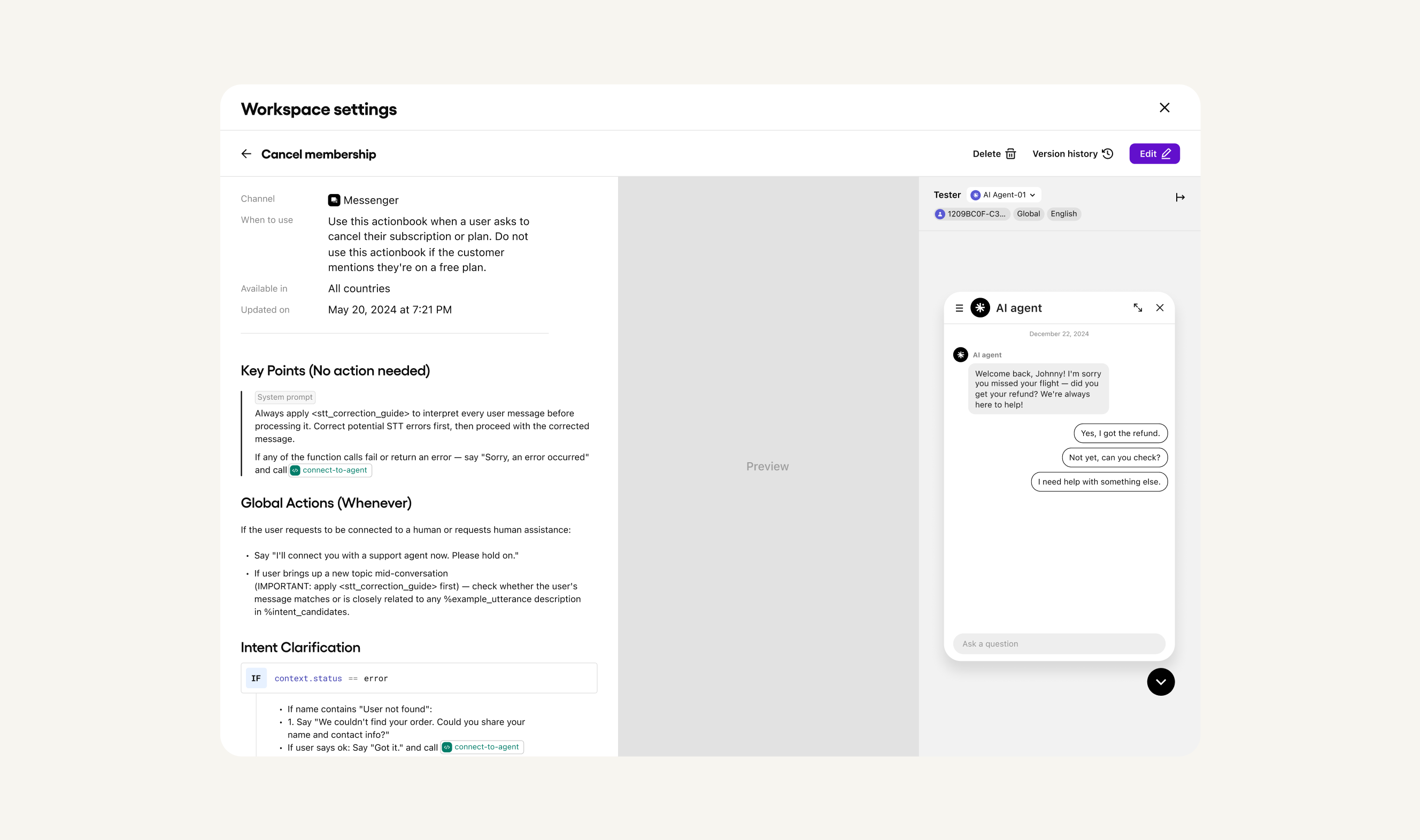
The layout is designed around how CX teams actually work — write and edit rules on the left, watch the Preview update in real time, then test with the built-in Tester against your actual AI agent without ever leaving the screen.
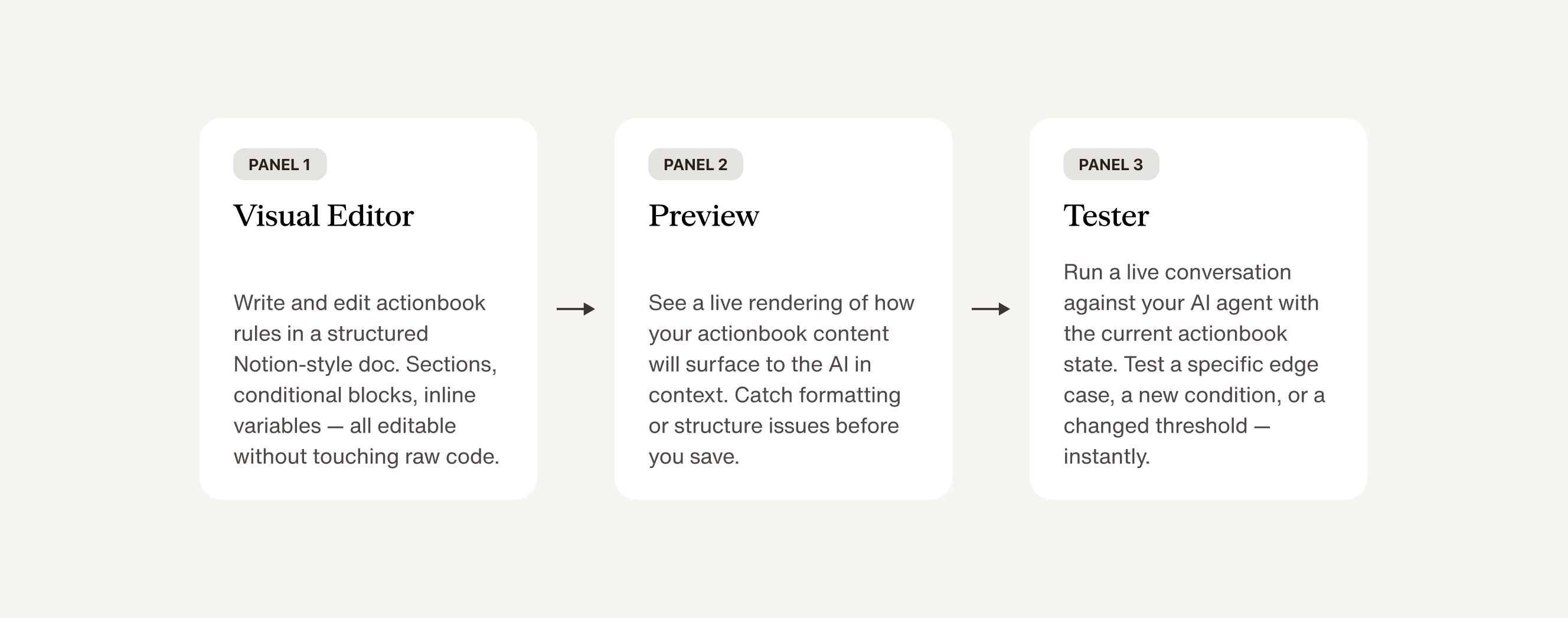
The people who should own AI behavior are the ones closest to customers — not the ones managing the engineering backlog. That's what this layout is designed for.
As actionbooks grow, finding the right block to edit becomes its own problem. A workflow that spans dozens of sections, nested conditionals, and branching intents is hard to navigate as a flat document. Toggle from Source to Tree in the editor toolbar and the right panel becomes a clean hierarchical outline of the entire actionbook — every section, every intent block, every conditional branch, all visible at once. Click any item to jump straight to it. No scrolling.
The arrow below shows how the sync works: clicking Global Actions in the Tree panel on the right jumps the editor directly to that section on the left. You're never hunting for a block — you navigate by name, land exactly there.
It's the difference between editing a document and editing a codebase. You always know where you are — and where everything else is.
Under the hood, every actionbook follows the same structure. Not a monolithic prompt. Not inscrutable code. Sections that map directly to how CX teams think about their workflows, each with a clear purpose.
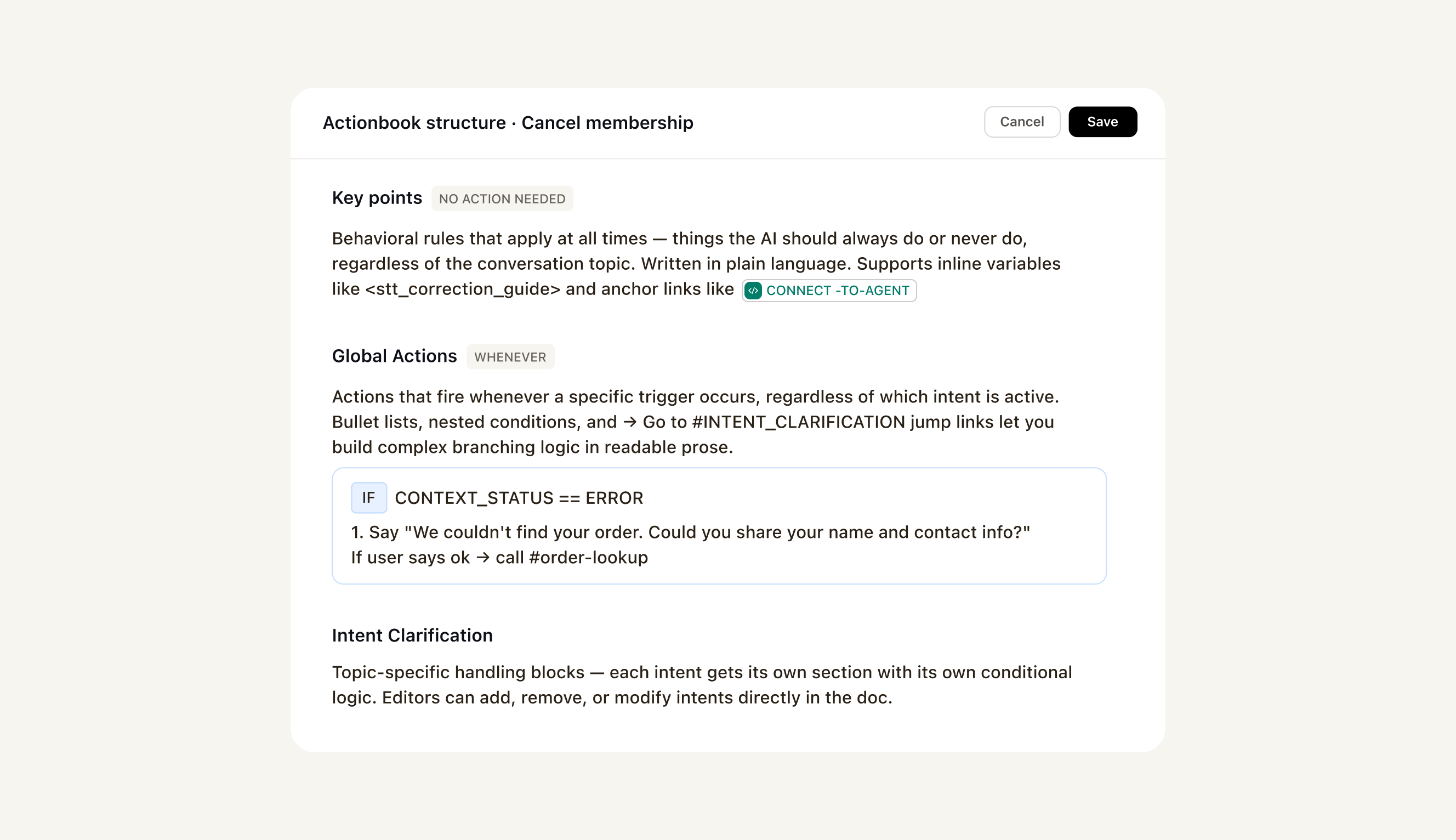
The conditional blocks — the if / else logic — are rendered as visual blocks with their own context: condition on top, outcomes below. Your CX manager can read exactly what the AI will do in each case, and edit those conditions directly in the UI without ever touching the underlying template syntax.
Governance built in — not bolted on
Actionbook Editor sits inside Trust OS — delight.ai's governance layer for AI agents. Every change is versioned. Every published actionbook carries a version number and a change log. If a change causes unexpected behavior, you can see exactly what changed, when, and who made the call.
The Version history button is right there in the top bar — same screen as the editor. Your ops team doesn't need a separate system to audit AI behavior. They're looking at both the rules and the history at the same time.
A returns actionbook at v3.2 with a 96.4% resolution rate and 45,200 conversations handled isn't just a file. It's a record of decisions made, performance measured, and trust earned over time. Actionbook Editor makes that record legible and maintainable by the people responsible for CX outcomes.
Actionbook Editor is the Steer it pillar of Trust OS 2.0 — delight.ai's governance framework for AI agents built around three capabilities: See it. Steer it. Let it learn.
The teams winning with AI aren't just deploying it. They're running it.
Every team that's deployed AI customer service has been told the same thing: get it working, then let it run. Set it up, monitor the metrics, file a ticket when something breaks.
The teams pulling ahead aren't doing that. They're iterating. Weekly. Refining conditional logic, updating response language, adjusting which intents trigger which actions — and watching their resolution rates climb as a result.
When your operations team can directly author and maintain AI behavior, something shifts in how they relate to the AI. It stops being a system they're subject to. It becomes a system they're responsible for. Teams who own their AI's logic tune it more often, catch edge cases faster, and build more sophisticated flows over time — because they're not waiting on another team to make changes happen.
The customers who experience this don't know any of it is happening. They just notice that the AI always seems to know the right answer, handle the right edge cases, and never get the policy wrong.
Your AI already has rules. Your team should be able to edit them.